Your manuals. Answered in seconds.

NS-DocNavigator — intelligent document retrieval and knowledge system for manufacturing, engineering and quality teams.

Turn thousands of pages of manuals, SOPs, QMS documents, engineering specs and training material into instant, AI-powered answers — with page-level source citations and deployment on your own infrastructure.

30+ formatsPDF, Office, images, HTML, web, SharePoint and legacy formats.
100% on-premiseYour documents never leave your infrastructure unless you choose cloud AI.
Every answer citedDocument, page and passage traceability for every claim.
Source-Cited Answers 30+ File Formats Image Understanding Web & SharePoint On-Premise Deployment AI Provider Flexibility

Watch the DocNavigator overview

A seven-minute walkthrough of how DocNavigator turns technical documents into cited, searchable AI answers.

The problem: the answer exists, but finding it is slow

Most organisations accumulate documentation faster than they can organise it. The result is hours lost in manuals, knowledge locked in PDFs and legacy formats, inconsistent interpretation, weak traceability, and slow onboarding for new staff.

Hours → secondsCompress manual search into a natural-language answer.
Single sourceSearch across manuals, SOPs, QMS, specs and training material.
Audit readyAnswers cite exact source documents and pages.
Day-one accessReduce onboarding friction for complex technical knowledge.

Ingest. Understand. Answer.

NS-DocNavigator is not just a chatbot over files. It builds a searchable vector + graph knowledge base, then answers with cited evidence.

Ingest

Upload documents, batch ingest files, fetch URLs, or crawl SharePoint/intranet sources. Docling parses text, tables and images from 30+ formats.

Understand

Semantic chunking, contextual retrieval, embeddings, image captioning and entity extraction build a LanceDB + FalkorDB knowledge layer.

Answer

Hybrid search, reranking, CRAG, multi-hop decomposition and graph context feed the LLM, producing answers with clickable citations.

Retrieval intelligence built for real technical documents

Eight layered retrieval and reasoning techniques handle the failure modes that simple semantic search misses.

Hybrid AI Search

BM25 + dense vector search with Reciprocal Rank Fusion for exact part numbers and conceptual matches.

BGE Reranking

A cross-encoder reranks the shortlist by direct query-document relevance.

Corrective RAG

Checks relevance after rerank, reformulates and retries when the first pass misses.

Multi-Hop Reasoning

Breaks complex questions into sub-questions across multiple documents and procedures.

CausalRAG

Uses cause-and-effect relationships for troubleshooting and root-cause analysis.

Knowledge Graph

FalkorDB maps components, procedures, specifications and their relationships.

Contextual Retrieval

Each chunk gets document-level context so isolated snippets remain meaningful.

Agentic Tool Calling

Optional MCP tool calls let answers combine document knowledge with live system state.

Document handling, workflow and audit

Real document ingestion

PDF, DOCX, PPTX, XLSX, HTML, images, CSV, Markdown and legacy Office formats. Image-only PDFs trigger OCR; text PDFs skip OCR for speed.

Diagrams become searchable

Pages and figures are rendered, extracted and captioned by a vision model so schematics and illustrations are included in retrieval.

SharePoint and web crawl

Single URL ingest, recursive crawl, NTLM authentication, dry-run preview, dead-link reports, scheduled refresh and pause/resume.

Collections and permissions

Group documents by plant, line, system or customer. Collection permissions overlay Admin, Editor and Viewer roles.

PDF export

Export Q&A sessions with citations preserved for compliance hand-off, training material or offline reference.

RAGAS evaluation

Measure context precision, recall, faithfulness, answer relevancy and NS answer-completeness across evaluation runs.

Architecture that matches the complexity of the problem

The system is self-hosted, containerised and built around specialised stores for metadata, vectors and graph relationships.

FastAPI orchestration layer

Python 3.12+, FastAPI, Pydantic, asyncio, httpx and aiosqlite coordinate ingestion, retrieval, settings, authentication and streaming chat.

Three persistence layers

SQLite stores metadata, LanceDB stores vectors with Tantivy BM25 full-text indexing, and FalkorDB stores the knowledge graph.

Local ML where it matters

BGE-M3 embeddings, BGE reranker and local vision models can run on GPU; CPU mode remains usable for smaller deployments and demos.

Ingestion data flow

  • Upload, URL fetch or crawl writes source files to managed storage
  • Docling extracts text, tables and page images; LibreOffice handles legacy Office formats
  • Vision captioning makes diagrams, schematics and figures searchable
  • Semantic/recursive chunking, optional parent-child splitting and contextual retrieval prepare the corpus
  • Embeddings go to LanceDB; entities and relationships go to FalkorDB

Query data flow

  • Intent routing skips the heavy RAG path for greetings and feedback
  • Conversation history is rewritten into a standalone query
  • Query expansion injects synonyms, abbreviations and glossary terms
  • Hybrid search + reranking + CRAG select the strongest evidence
  • Graph context, parent chunks and optional MCP tool output feed the final cited answer

Where it fits

Built for teams that need fast answers without losing provenance or control of sensitive technical content.

Manufacturing, maintenance & engineering

  • "How do I troubleshoot error code X on machine Y?"
  • "Which procedure references this sensor or component?"
  • "What causes this fault and what checks come first?"

Quality, compliance & onboarding

  • "What does the QMS say about nonconforming product?"
  • "Where is the calibration procedure and acceptance criteria?"
  • "Generate a cited hand-off summary for this training question."

Screenshots

Real UI from the current implementation: chat, document ingestion, provider settings, ingestion controls, retrieval controls and built-in help.
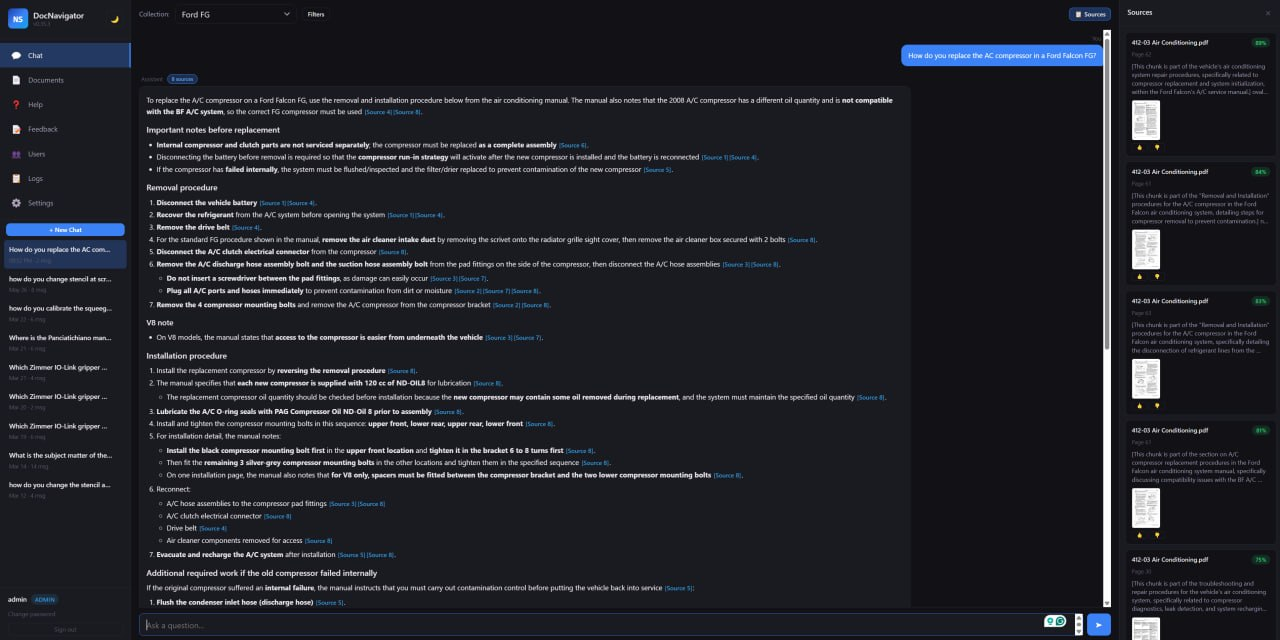
NS-DocNavigator chat interface showing a cited answer with source documents and page references

Chat

Ask natural-language questions and get cited answers with source documents, page references and follow-up prompts.
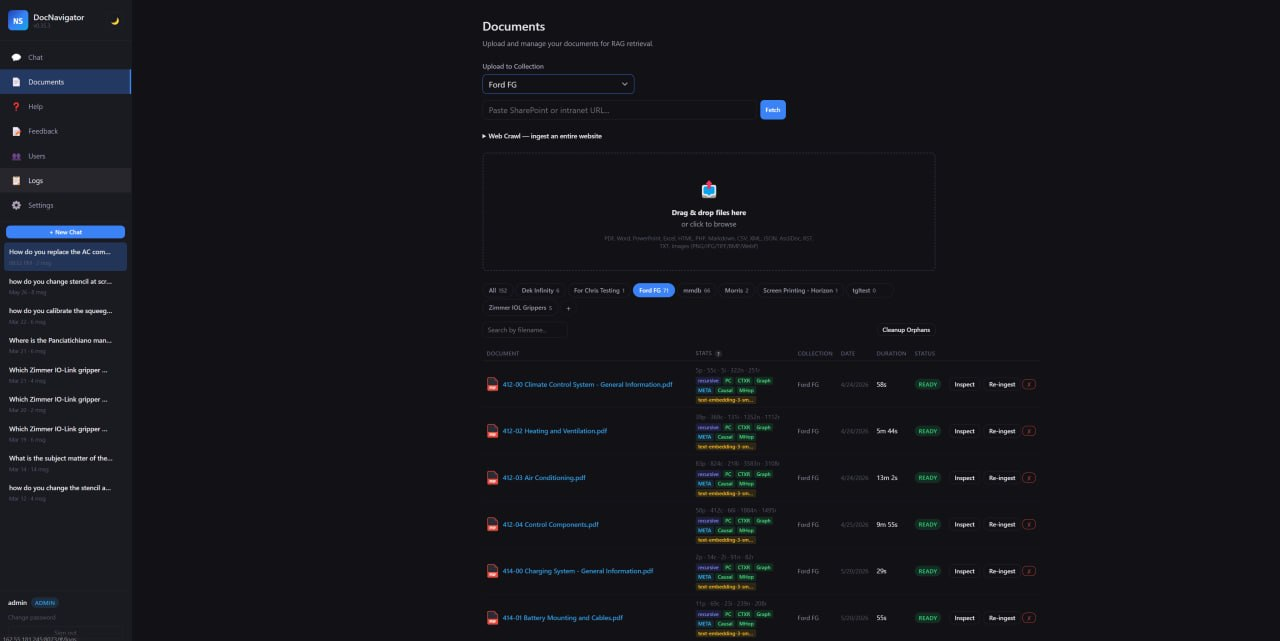
NS-DocNavigator documents screen with collection selector, SharePoint URL fetch, web crawl and upload area

Documents

Upload files, fetch SharePoint/intranet URLs, crawl sites and manage processed documents by collection.
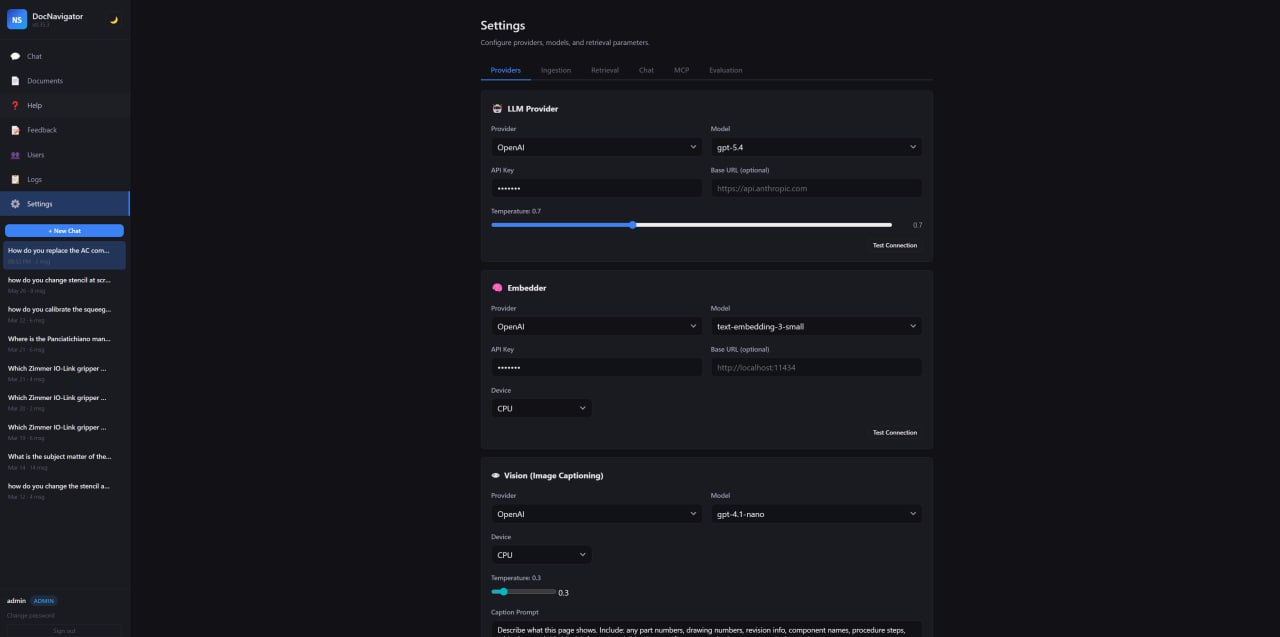
NS-DocNavigator provider settings showing LLM, embedder and vision model configuration

Provider Settings

Configure LLM, embedding and vision providers, test connections and keep API keys masked in the UI.
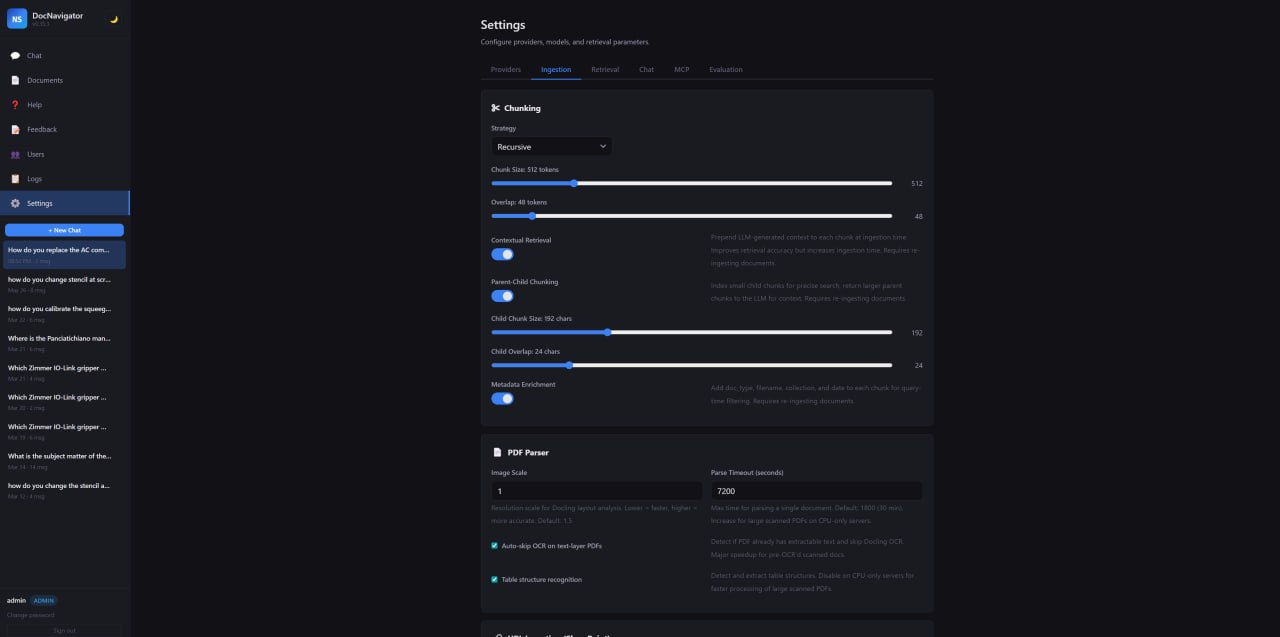
NS-DocNavigator ingestion settings showing chunking, contextual retrieval, OCR and table recognition controls

Ingestion Controls

Tune chunking, contextual retrieval, metadata enrichment, OCR, table recognition and parse timeouts.
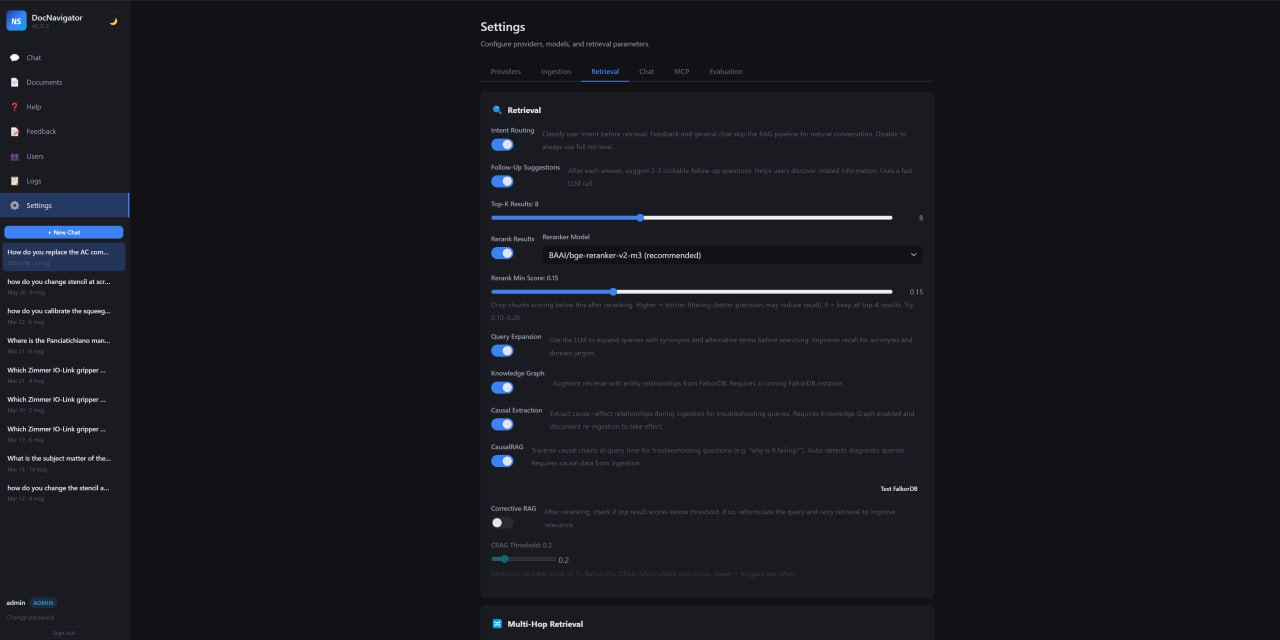
NS-DocNavigator retrieval settings showing top-k, reranking, query expansion, knowledge graph and CausalRAG controls

Retrieval Controls

Tune top‑k results, reranking, query expansion, knowledge graph retrieval, CausalRAG and corrective RAG.
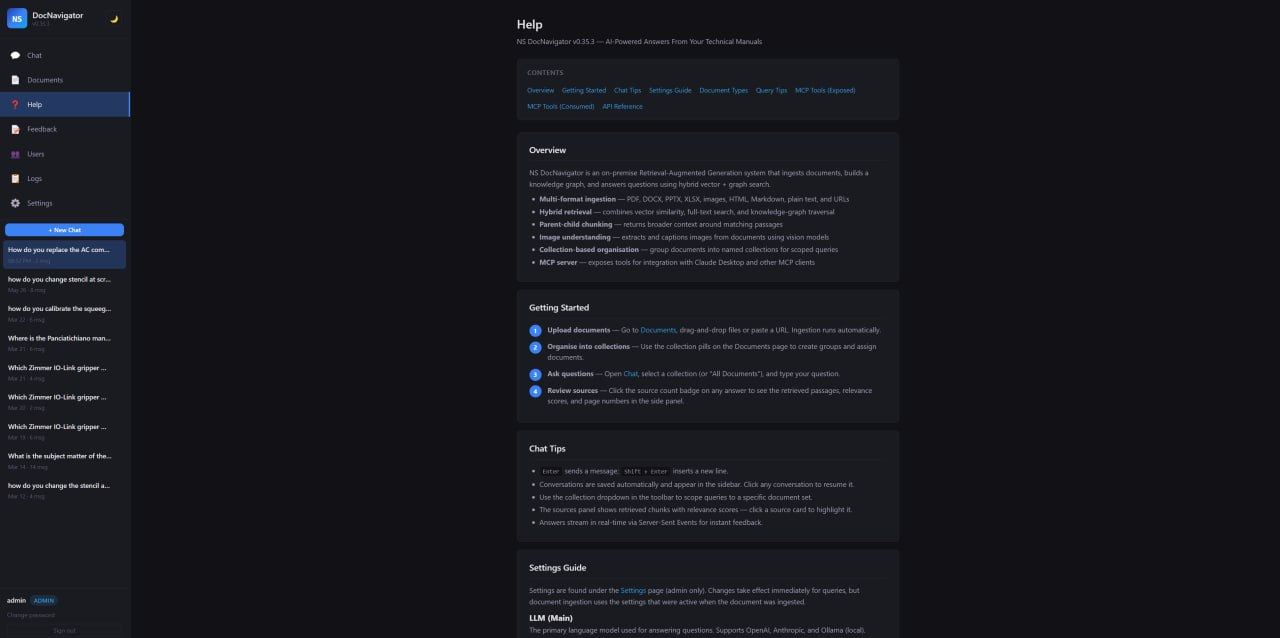
NS-DocNavigator help screen showing overview, getting started, chat tips and settings guide

Built‑in Help

Inline documentation covers overview, getting started, chat tips, query tips, settings and MCP tooling.

Private by design, flexible by configuration

Security & governance

  • JWT authentication with bcrypt password hashing and admin approval workflow
  • Role-based access control at every API endpoint, plus collection-level permissions
  • Provider API keys encrypted at rest, masked in the UI, and omitted from settings export
  • SSRF protection for URL ingestion, parameterised SQL, XSS protection and configurable CORS
  • Audit logging for queries, uploads, deletes, re-ingestion and admin actions

AI provider flexibility

  • Cloud AI: Anthropic Claude or OpenAI for best-quality answers
  • Local AI: Ollama for zero external calls and predictable cost
  • Hybrid: cloud for chat, local for ingestion, embeddings and graph extraction
  • Separate providers for chat, embeddings, vision, reranking, graph extraction and intent routing
  • Runtime provider switching through Settings — no restart, no downtime, no lock-in

Simple deployment

  • docker compose up starts the backend, MCP server and FalkorDB
  • SQLite, LanceDB and FalkorDB run embedded — no external database server required
  • Persistent Docker volumes for data, uploads and cached AI models
  • Works CPU-only for small deployments; NVIDIA GPU recommended for production ingestion
  • Minimum: 16 GB RAM / 4 cores / 50 GB disk; recommended GPU: 32 GB RAM / RTX 4070+

Administration built in

  • Settings dashboard for providers, chunking, CRAG thresholds, glossary and evaluation
  • Real-time log viewer via Server-Sent Events
  • User approval, activation, deactivation and role assignment
  • Document inspect modal with ingestion config, chunk count, image count and model used
  • Selective re-ingest after changing embedder, chunking or contextual retrieval settings
  • 28 REST API tests plus 85+ backend/browser E2E tests before release

MCP Integration

NS-DocNavigator is not isolated behind its own UI. It can expose its retrieval capability to other agents, and it can call external tools while answering.

MCP server

Retrieval and chat endpoints are exposed through a stateless HTTP MCP endpoint at /mcp, protected by separate API-key authentication.

MCP client

The generation loop can call configured MCP tools mid-answer, then continue reasoning with tool output included in the final response.

Document knowledge + live state

Useful for questions that combine manuals and procedures with live production state, tickets, analytics or internal systems.

NS-DocNavigator FAQ

Common questions about privacy, deployment, citations and real-world use.

Is this just a chatbot over PDFs?

No. The system builds a searchable vector + graph knowledge base, uses hybrid search and reranking, checks relevance, handles multi-hop queries, and cites its sources.

Can it run on-premise?

Yes. It is designed for self-hosted deployment. Documents and queries stay on your infrastructure unless you explicitly configure a cloud AI provider.

Does it cite exact sources?

Yes. Answers include citations that link back to the document and page, with the supporting passage available for verification.

Can it connect to SharePoint, intranets and file exports?

Yes. It supports single URL ingest, recursive web crawl, NTLM-authenticated SharePoint/intranet sources, scheduled refresh and dead-link reporting.

Looking for broader AI help? See AI Solutions or AI Agents for Manufacturing.

Next step

Want a private AI assistant for your manufacturing knowledge?

If your teams waste time searching manuals and SOPs, NS-DocNavigator is built to make that knowledge usable. Book a short call and we’ll discuss your documents, constraints, and a sensible pilot.

Prefer to start with quick wins? Try our Free Tools or browse all products.