NS-HPDCA · Test Data Collection & Analysis

Test Data Collection & Analysis
Flying Probe · ICT · FCT

NS-HPDCA

Bring production yields, top defects, unit history and measurements together. NS-HPDCA collects and analyses the logs from your existing testers, giving production, test and quality teams access to the information behind each result.

More Than a PASS or FAIL Count

Your testers already produce the data. NS-HPDCA collects it and makes it usable: production yields, top defects, unit history and measurements in one collection and analysis system.

Start with the production overview to see where attention is needed. Then search the records for a product, test program or serial number and examine the available test detail. This connects the reporting view with the evidence engineers need to investigate failures.

HPDCA works with your existing Flying Probe, ICT and FCT equipment. The value is in collecting and analysing its results—not replacing your testers.

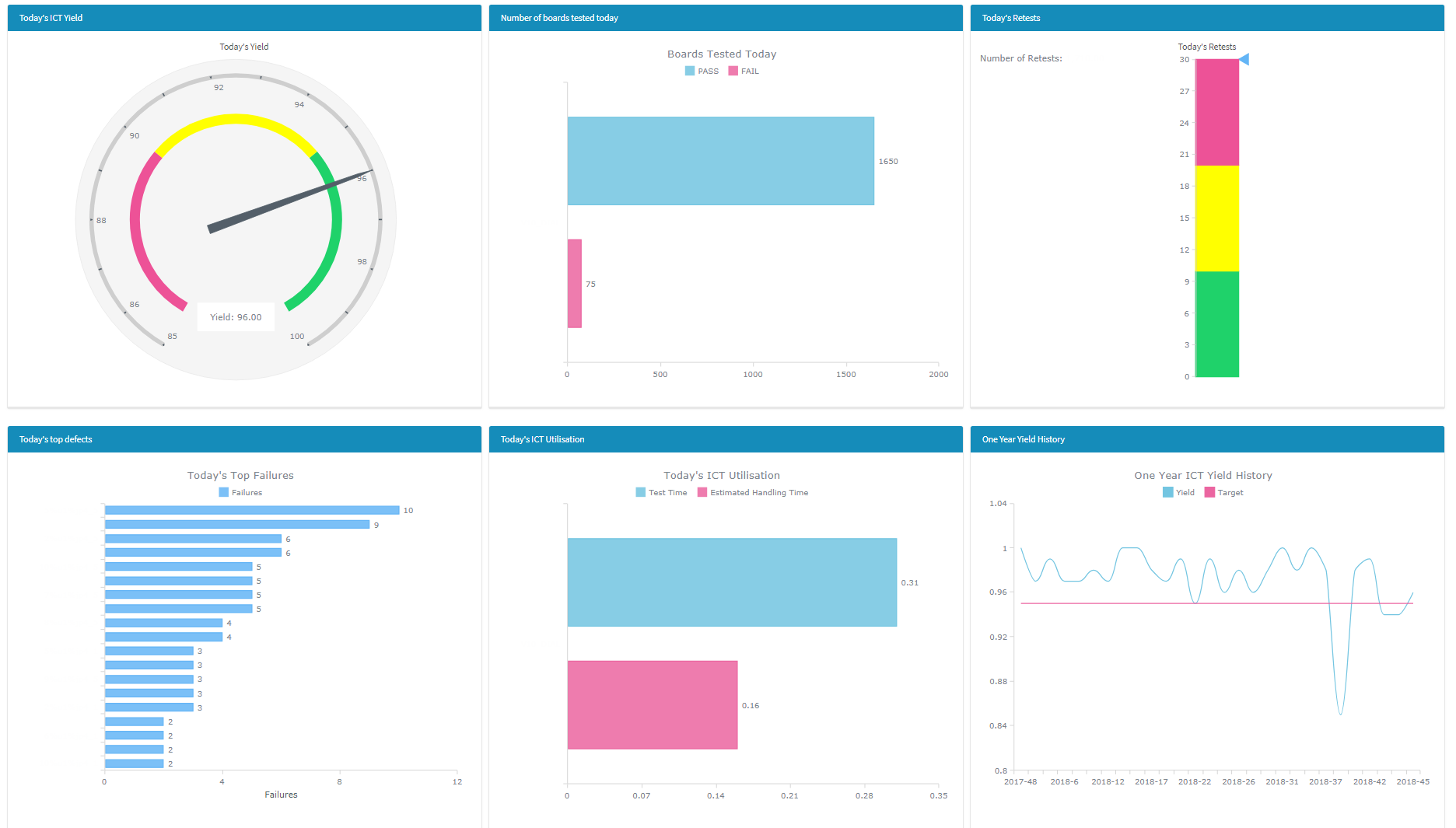
NS-HPDCA Real-Time ICT Dashboard
Real-Time ICT Dashboard — click to enlarge

Two Components, One Solution

NS-HPDC

Data Collector

The collector parses tester log files and stores results in MySQL. Automatic collection brings new results into the system as logs become available, rather than requiring operators to compile separate reports.

  • Parsing for supported Flying Probe, ICT and FCT formats
  • Automatic storage of test results
  • Retention of available measurements and failure detail
  • Custom parsers for additional tester formats
NS-HPDA

Data Analyser

The analyser provides dashboards, searches and reports through web or desktop interfaces. Production teams review performance, engineers investigate test failures, and quality teams retrieve unit history.

  • Production yield and historical trends
  • First-pass and retest analysis
  • Top defects by component or test step
  • Cycle time and utilisation reporting
  • Unit history and measurements

From Production Overview to Individual Results

Production Yields

Review test performance by product and reporting period. Compare current results with historical trends to focus investigation on affected production.

First-Pass & Retests

Look beyond the final pass count. Distinguish first-pass performance from results achieved after further testing, so repeat tests are not hidden by the final outcome.

Top Defects

Identify recurring failing steps and components. Ranked defect reports help prioritise investigations instead of reading individual log files to find repeated failures.

Search & Unit History

Find a serial number and review its recorded test history. Product, program, machine and date information provide context for investigating a unit or production run.

Measurements & Test Detail

Examine the data behind the board-level result. Measurement and failure detail depends on what the source tester records and the configured parser extracts.

Cycle Times & Trends

Review recorded test times across products, programs and machines. Compare periods to investigate changes in test duration alongside yield and retest behaviour.

Flying Probe, ICT and FCT

A common collection and analysis environment for different test-log formats.

FLYING PROBE

Takaya APT

Collect and analyse Takaya test logs for production yields, recorded failures and unit history. Review the results through HPDCA rather than searching each machine’s files separately.

ICT

HP3070 / Agilent · IFR4220

Collect in-circuit test results for yield reporting, failure analysis and unit history. Retain the detail provided by the tester logs for investigation beyond the overall board result.

FCT

Functional Test Systems

Bring functional test logs into the same workflow. Custom parsers map each station’s output into structured records for reporting and analysis.

Compatibility is established from the log format and available fields. Send a representative anonymised log with the tester model and software version so we can confirm the existing parser fit or the custom parsing required.

From Test Log to Usable Information

1

Test

Your Flying Probe, ICT or FCT system produces its test log.

2

Collect

The configured parser extracts the available test data.

3

Store

Results are retained in a structured MySQL database.

4

Analyse

Review dashboards, investigate failures and retrieve unit results.

Depending on the source log, records can include serial number, product, program, tester, timestamps, PASS/FAIL status, measurements and failing steps. The parser extracts what the test system records; not every format provides the same detail.

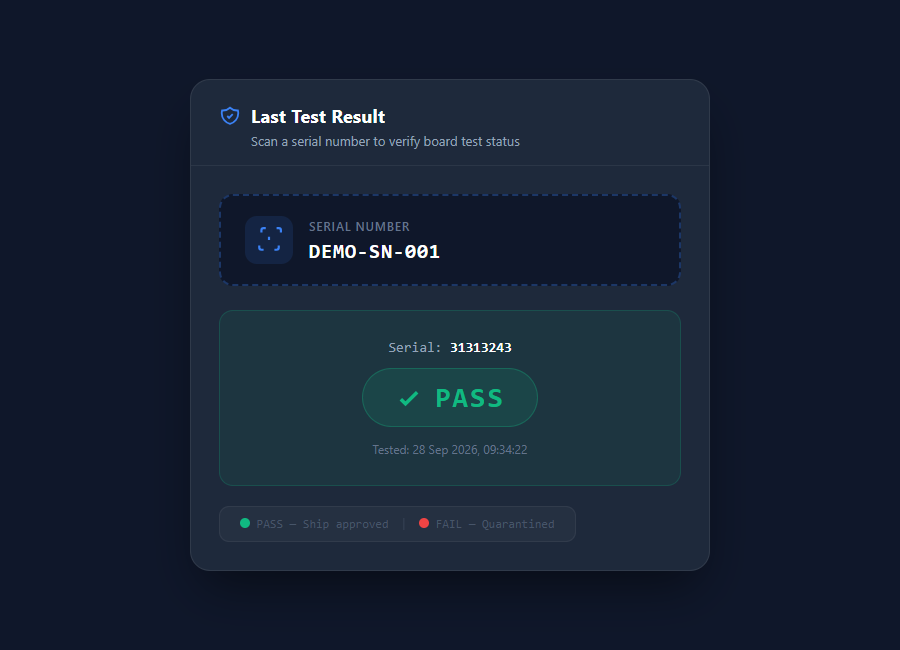
Last Test Result

Scan a board’s serial number to retrieve its latest recorded test result and display PASS or FAIL. Operators can check the stored result without locating and opening the original test log.

This supports a result check at a quality or shipping station. The operator follows the site’s release procedure based on the displayed result.

Last Test Result showing a demo serial number and PASS
Scan a serial number to retrieve the latest test result

Fit the Software to Your Test Environment

Collection & Access

HPDCA uses a MySQL database with Windows and web interfaces. Collection arrangements depend on where the tester writes its logs and how those files are made accessible.

During evaluation, we review source formats, log locations, reporting needs and access arrangements. Hosting and data-retention requirements can then be agreed for your environment.

Reporting & Integration

Test data can support wider reporting and integration requirements. Discuss the information needed by your existing BI, MES or ERP systems so the data exchange can be scoped around your workflow.

Provide tester types, an anonymised sample log and the questions your team needs answered. The demonstration can then focus on relevant reports and collection requirements.

Collection Monitoring and Test Reports

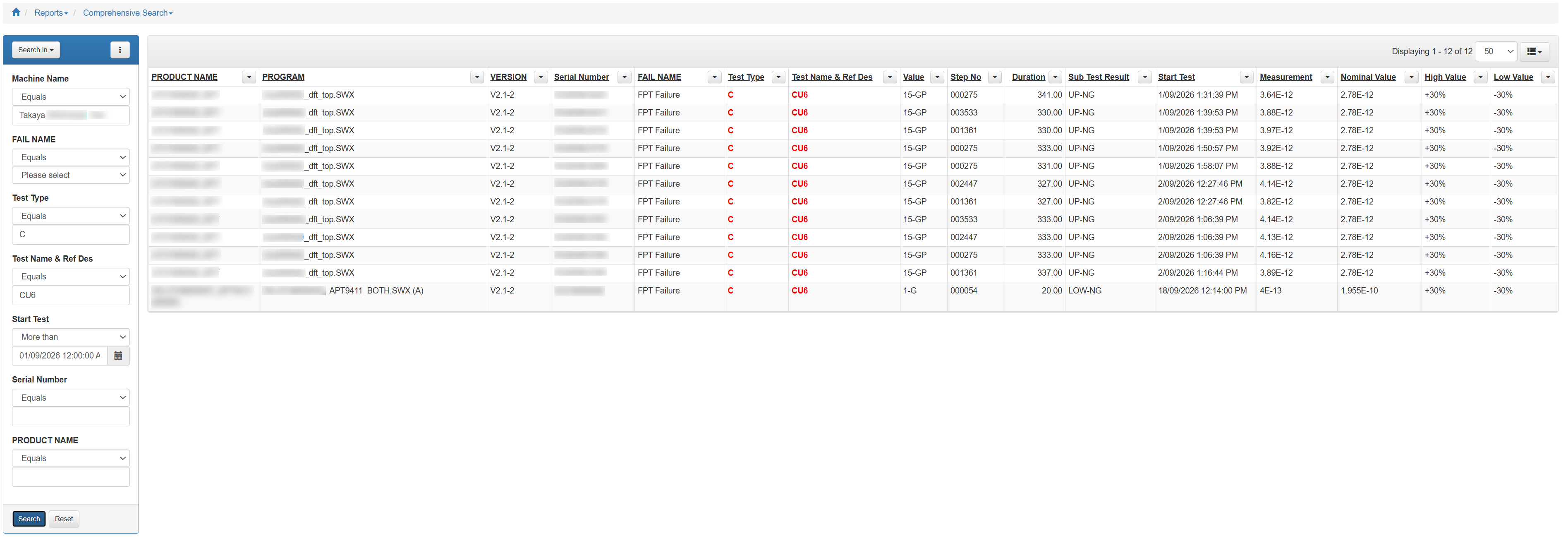
Comprehensive search results showing test failures with measurements
Comprehensive Search
Search results with failure details, measurements and pass/fail limits.
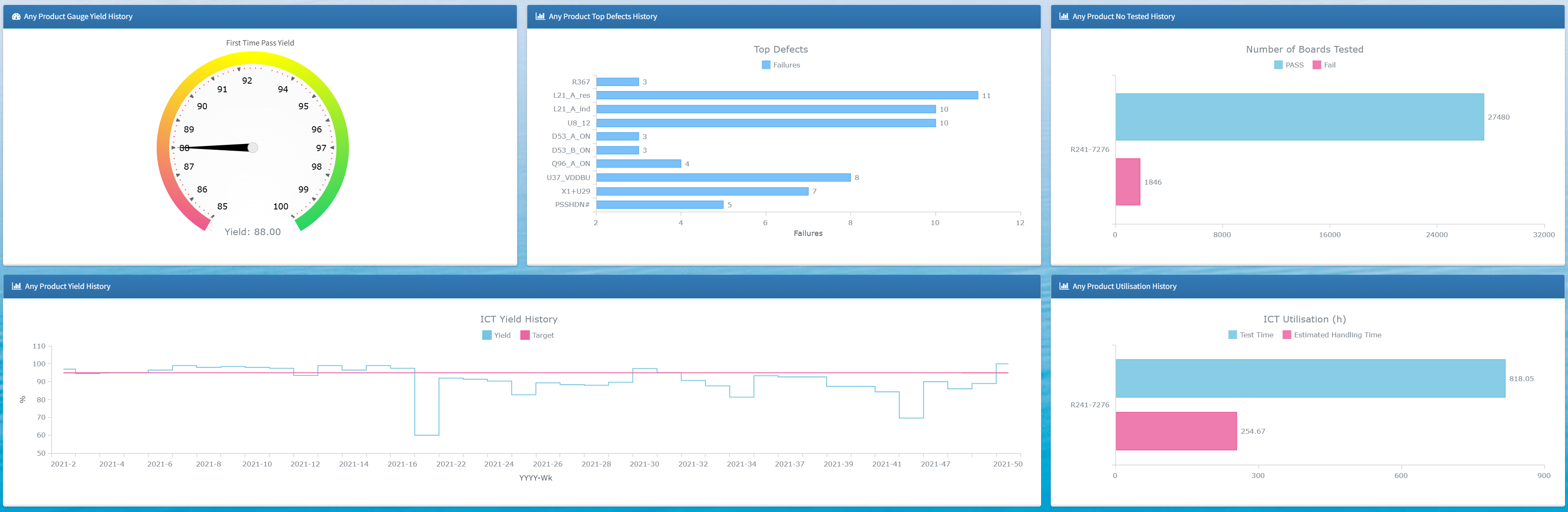
Product history dashboard showing one year of test performance
Product History Dashboard
Year-over-year test performance — yields, failures, retest rates and utilisation.
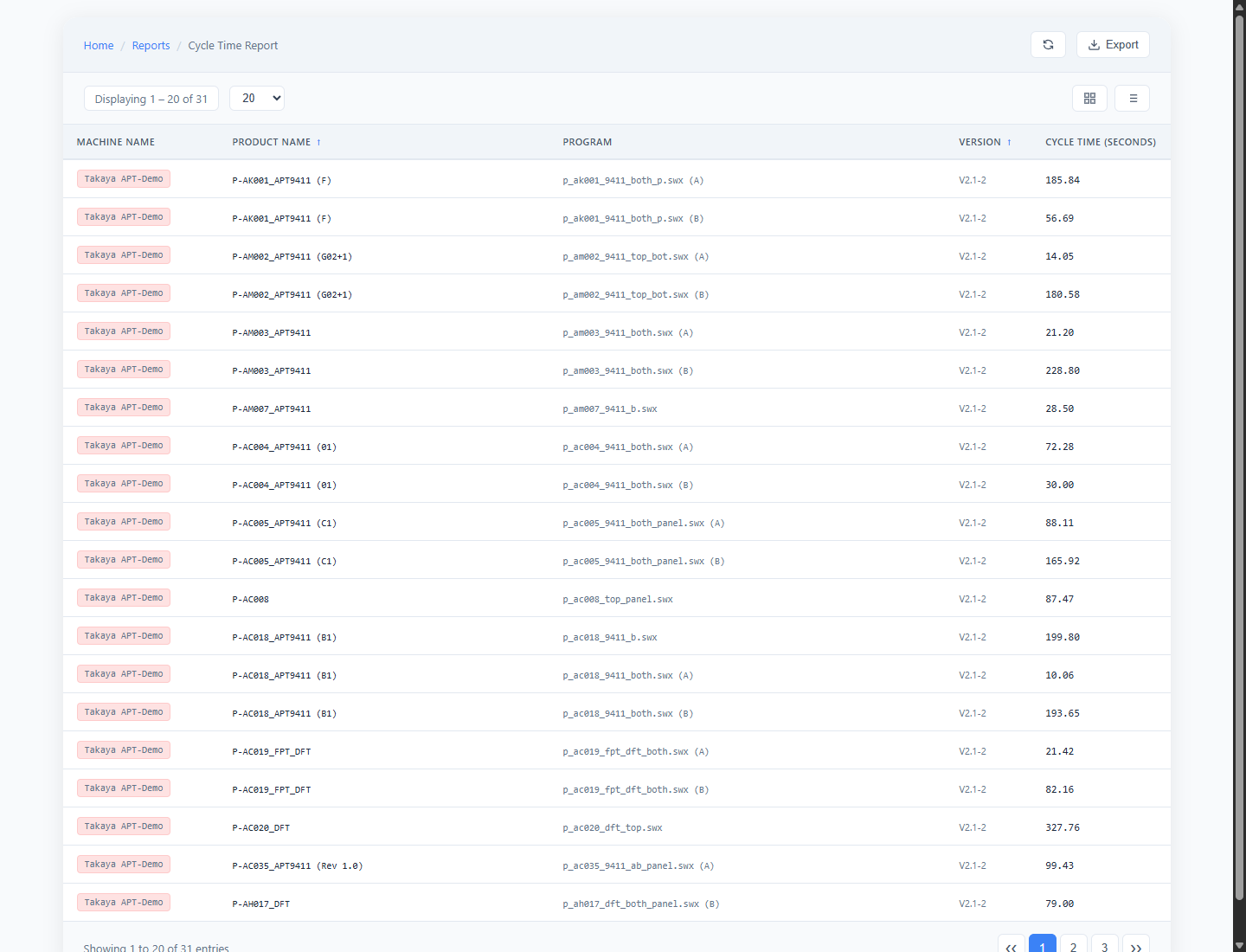
Cycle time report
Cycle Time Report
Compare recorded test times by product, program and machine.
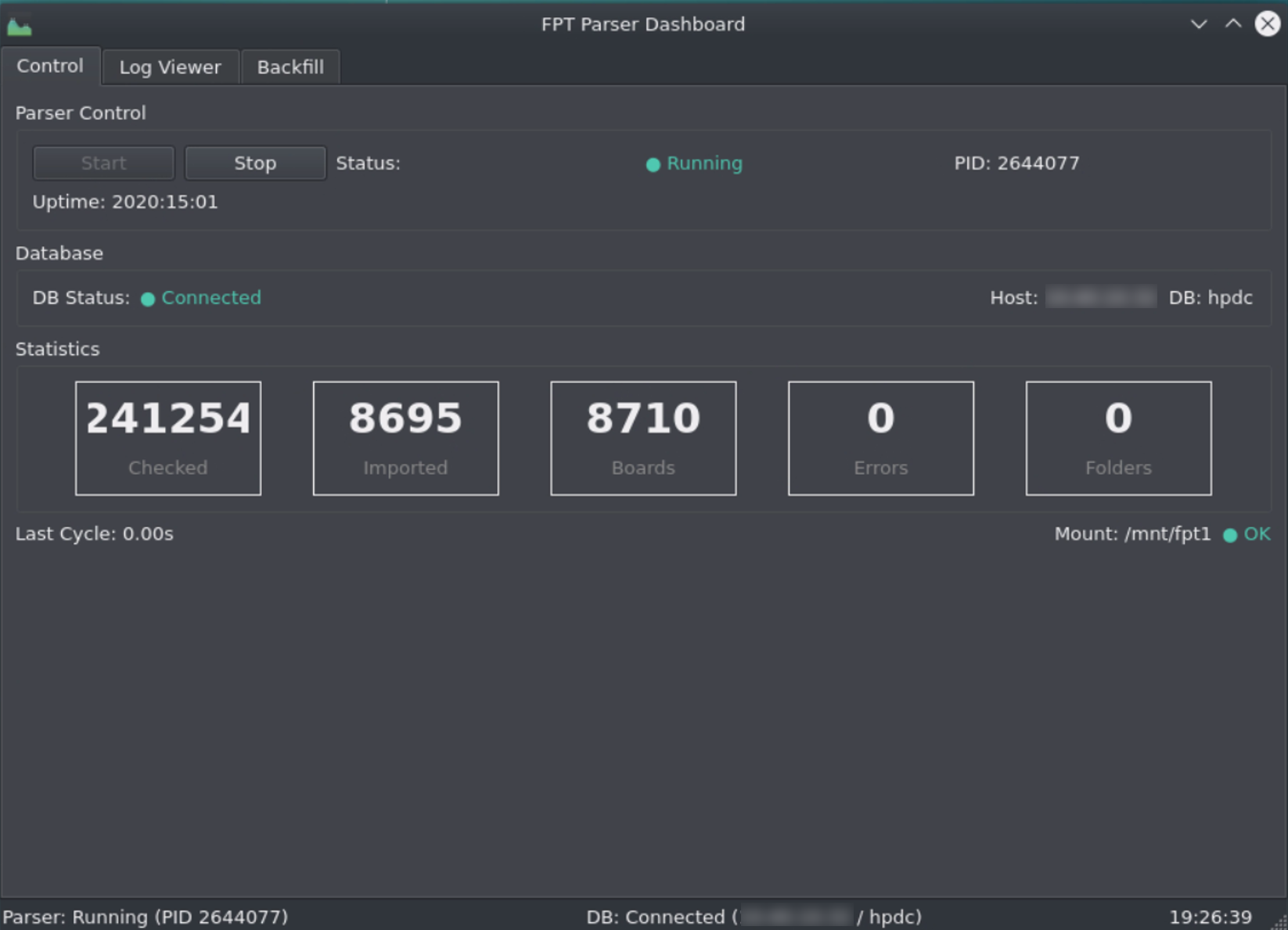
Parser dashboard
FPT Parser Dashboard
Monitor parser status, import counters and database connection.

Technical Questions

Does HPDCA replace the tester software?

No. HPDCA collects and analyses logs produced by your existing test systems. The tester continues to perform its tests.

Can you add another log format?

Yes. Custom parsers extend collection to additional Flying Probe, ICT and FCT systems. A representative log establishes the available data and mapping required.

Does every tester provide the same detail?

No. Available fields and measurements depend on the source log and parser configuration.

What does Last Test Result show?

Scan a serial number to retrieve the latest recorded test result and display PASS or FAIL.

Ready to Connect Your Test Floor?

Tell us which testers you use and what you need to learn from their results. We can review log compatibility and demonstrate the relevant collection and analysis workflow.